BUILT FOR THE BUSINESS OF CARDS

Your table.
Your business.
Under control.

From the first scan to the final sale. Manage your deals, inventory, and show-day profit with one clear view of your business.

14 days of Vendor Pro. No card needed.Free access with your invite.

iPhone & webOne account. Always in sync.
ONE WORKSPACE. EVERY DEVICE.IPHONE + WEB
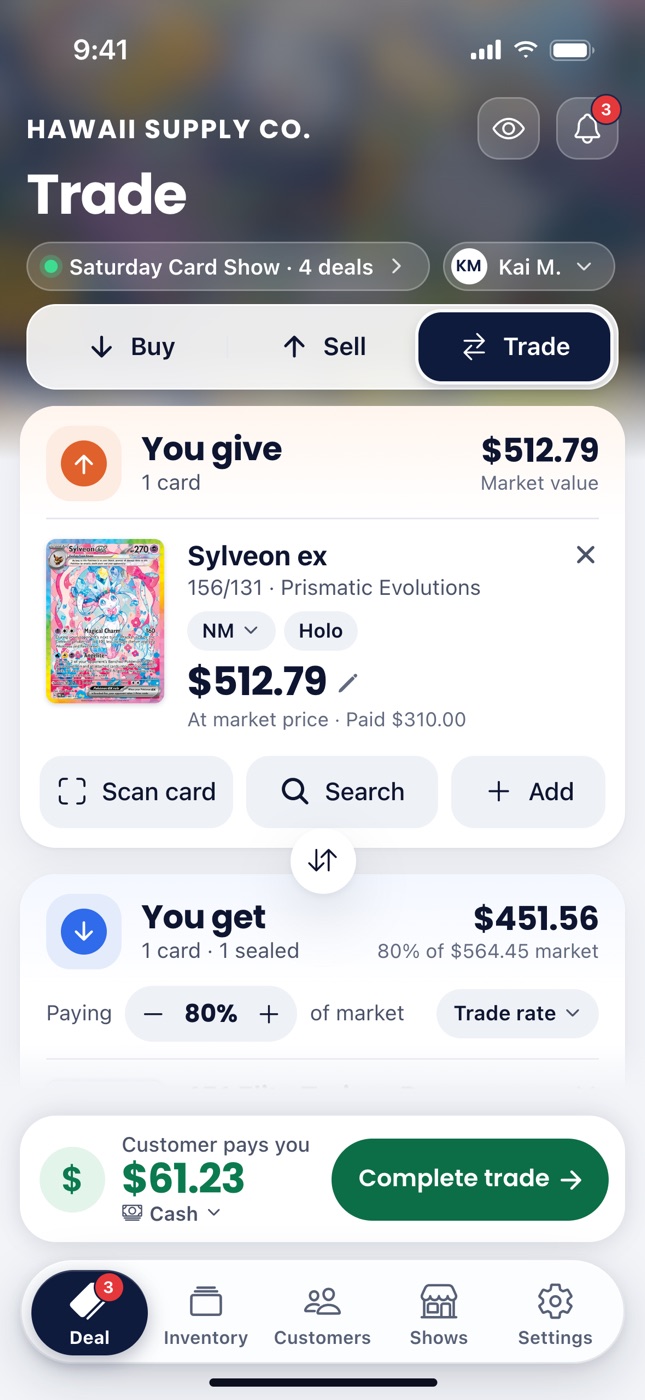
Actual CardBull iPhone Trade screen: the cards you give, the cards you get at 80% of market, and what the customer pays.
Desktop preview with example prices Actual iPhone screen
RUN YOUR CARD TABLE LIKE A BUSINESS.Scroll to explore

The games
we cover.

  • Pokémon
  • Japanese Pokémon
  • Magic: The Gathering
  • Yu-Gi-Oh!
  • One Piece

ON YOUR PHONE. AT YOUR TABLE.

Less juggling.
More dealing.

Scan, trade, and track your show from your phone. Explore the app screens as you scroll to see what each part does.

01 / SCAN & DISCOVER
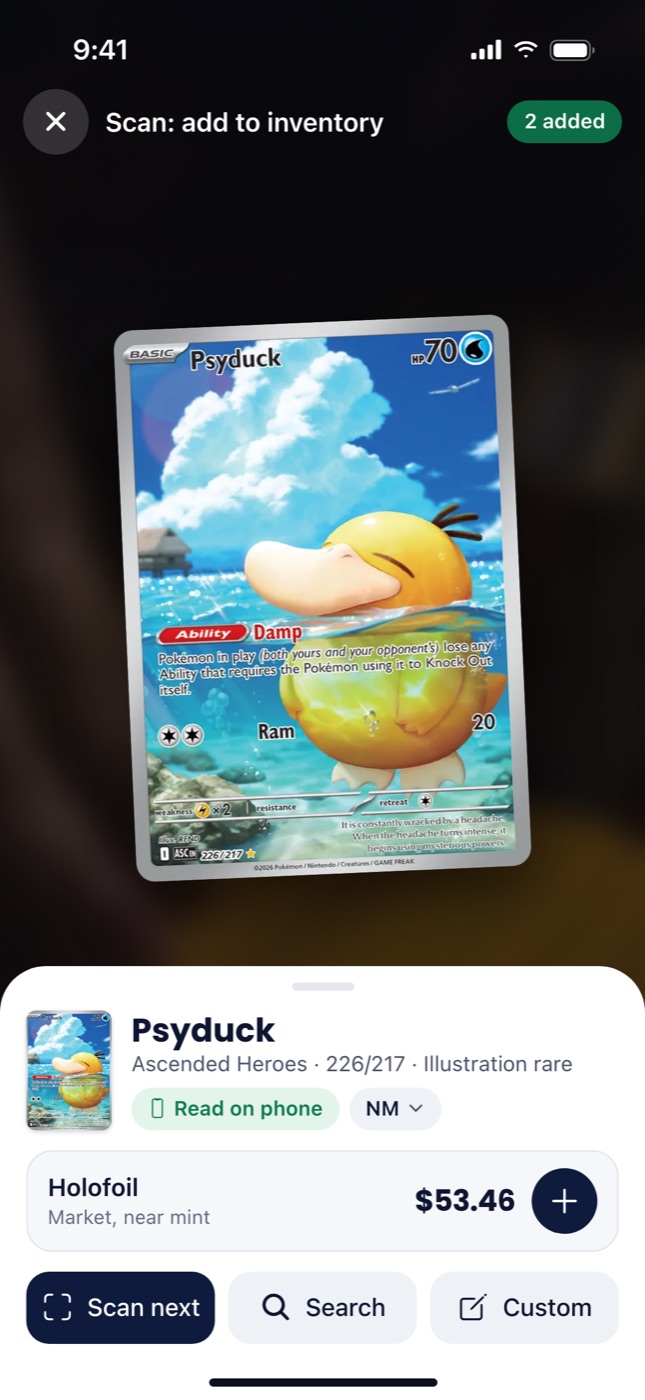
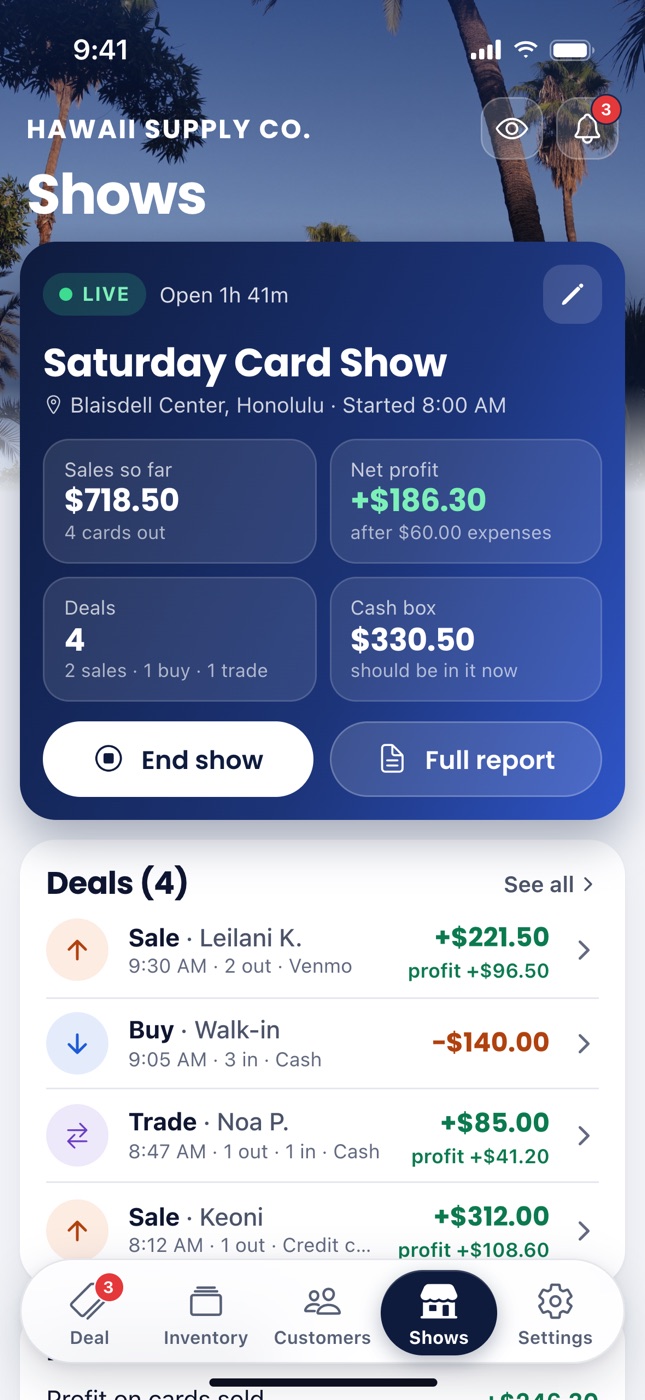
CardBull scanner showing a card ready to identify.CardBull trade screen showing cards given, cards received, and the cash difference.CardBull show screen with sales, net profit, deals, and cash box.
FROM THE CARDBULL APP
01 / SCAN & DISCOVER

Know the card.
Know the value.

Point your camera. Find the card. See its market price. Move through a stack with Rapid scan, or capture multiple cards with Bulk Scan.

  • Live prices, adjusted for condition
  • Search by name, set, or number
  • Alerts when you find a wanted card
Explore scanning
02 / BUY, SELL & TRADE

Make the deal.
We'll do the math.

Buy, sell, and trade on one screen. Set your own rates and see exactly who pays whom, before you shake hands.

  • Your buy percentage. Your trade rate.
  • A clean customer view of every deal
  • Receipts in your business name
See how deals work
03 / TRACK & UNDERSTAND

Know how
your show went.

Every deal rolls into your show report. See your sales, cash box, and actual profit after table fees and expenses, all day long.

  • Sales and profit that update as you deal
  • A clear breakdown by payment type
  • Compare shows to plan your next table
Explore show reports

AT THE TABLE. BACK AT YOUR DESK.

Same business.
A bigger perspective.

Your phone keeps the deals moving. Your computer gives you room to work through inventory, review a show, and get the books in order.

CARDBULL ON YOUR COMPUTER

SHOW OVERVIEW

Saturday Card Show

Sample data

Total sales

$1,248.5012 deals recorded

Net profit

+$386.30After $60.00 expenses
Sales throughout the day Cumulative sales
9:00 AM11:00 AM1:00 PM3:00 PM
⇄Buy. Sell. Trade.Every deal, accounted for.
All in one place
Explore the tabs inside the screen. Illustrative desktop overview with sample data.
01 / ORGANIZE

Your inventory, with room to work.

Use your keyboard to search and manage your cards. Import an existing collection from Excel or CSV.

Explore inventory imports
02 / UNDERSTAND

A complete picture of the show.

Review your sales, expenses, and profit. See how each show performed and which ones are worth the table.

See show reports
03 / STAY CONNECTED

Pick up where you left off.

The same account on phone and computer. A deal at the table stays connected to the records on your desk.

Learn about your devices

THE BIGGER PICTURE

Built for the business
behind the cards.

Good records. Better decisions. Room to grow.

INVENTORY / 01

A clear view
of your whole case.

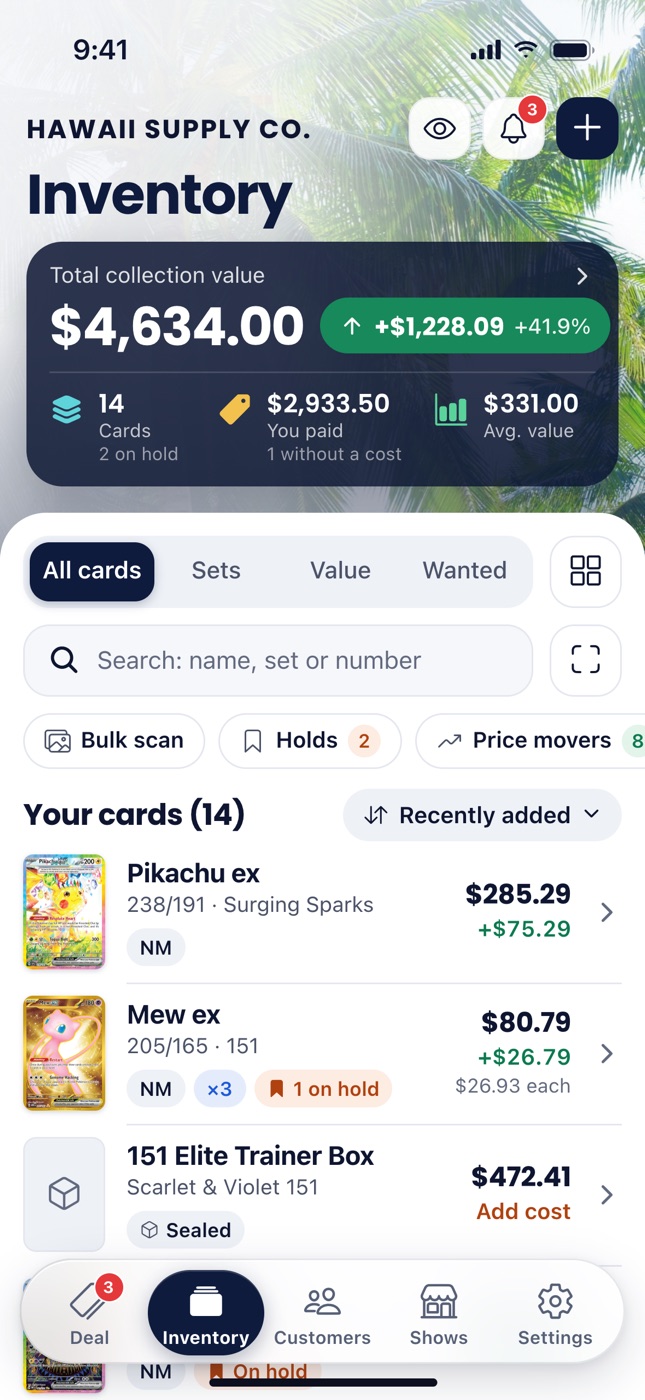
Track what you own, what you paid, and what it's worth. Bring your collection over from a spreadsheet and keep it current.

Meet your inventory
CardBull inventory screen with collection value, cost, individual cards, and sealed products.
Your inventory, in your pocket.
YOUR NUMBERS / 02

Share the deal.
Keep your edge.

A customer view shows the deal without your costs or profit. Hide your numbers with one tap when you need privacy.

Explore customer view
⇄

Connected across devices

Work the table on your phone. Review the day on your computer.

▧

Ready for the books

Sales tax, card fees, and year-end reports that make the details clear.

Vendor Pro reports
♧

Built around your customers

Keep want lists, manage holds, and give regulars a reason to return.

Vendor Pro

FROM SETUP TO SHOWTIME

Your next show.
A better way to run it.

Get started
  1. 01

    Make it yours.

    Create your account, add your business name, and set your buy and trade rates.

  2. 02

    Bring your cards.

    Scan your inventory, search for a card, or import your existing spreadsheet.

  3. 03

    Open your table.

    Start a show and make your first deal. CardBull keeps the numbers together.

SIMPLE PLANS. SERIOUS POSSIBILITIES.

From your first card
to your busiest table.

Free for collectors. Flexible plans for vendors.
Monthly billing. Cancel anytime.

Collector

Track your collection, free.

Free

Start free Go to your account

No card needed.

Free, with no end date.

What’s included:

  • Up to 500 cards
  • Phone scans, plus 25 AI checks a month
  • 30 Rapid scan cards a month
  • 30 days of price history
  • Bulk Scan
  • Complete this set
  • Price movers
  • Slab tracking with cert check
  • Export to a spreadsheet (CSV)
  • Collection value and gain, with what you paid
  • Wanted list with scan alerts
  • Sync between phone and web

Collector Pro

For serious collectors.

$5.99a month

Monthly, once plans open.

Monthly, once plans open.

Everything in Collector, plus:

  • Unlimited cards
  • 75 AI checks a month
  • Unlimited Rapid scan cards
  • 180 days of price history, growing
  • Graded (slab) prices
  • Price alerts

Vendor

Buy, sell and trade at your table.

$19a month

Try free for 14 daysCreate your account

The free trial is 14 days of Vendor Pro. No card needed.Starts with free access from your invite.

Monthly, once plans open.

Everything in Collector Pro, plus:

  • 150 AI checks a month
  • Buy, sell and trade, with receipts
  • Shows, cash box and show reports
  • Buy, sell and trade rates
  • Business name, profile and receipts
  • Invite vendors

Get in early. Grow with CardBull.

The first 50 vendors get Vendor Pro for $19/month, locked in while subscribed. Canceling or switching plans ends founder pricing.

spots remaining.

Start your trial
Compare every feature
What’s includedCollectorFreeCollector Pro$5.99 a monthVendor$19 a monthVendor Pro$39 a month
Cards500UnlimitedUnlimited
AI checks a month2575150
Rapid scan cards a month30UnlimitedUnlimited
Price history30 days180 days, growing180 days, growing
Bulk ScanIncludedIncludedIncluded
Graded pricesNot includedIncludedIncluded
Price alertsNot includedIncludedIncluded
Buy, sell and tradeNot includedNot includedIncluded
Shows and cash boxNot includedNot includedIncluded
Parked dealsNot includedNot includedOne at a time
Price tiersNot includedNot includedNot included
Customers, holds, layawayNot includedNot includedNot included
Storefront and offersNot includedNot includedNot included
Tax and year-end reportsNot includedNot includedNot included
Excel exportNot includedNot includedNot included
Print labelsNot includedNot includedNot included
Team members (later)Not includedNot includedNot included

Start with 14 days of Vendor Pro, no card needed.Create your account to use your free-access invite. Questions about plans? Visit our help center.

GOOD QUESTIONS

A little clarity.
Before you start.

More details, whenever you need them.

Visit the help center
Is CardBull just for vendors?

No. The free Collector plan lets you track up to 500 cards, scan your collection, and see its value. Vendor plans add the tools for buying, selling, trading, and running shows.

Can I use it on my computer?

Yes. CardBull works in your browser on a computer, tablet, or phone. Your account stays in sync across the web and iPhone, so you can manage inventory at your desk and deal at your table.

How does the free trial work?

Create an account to try Vendor Pro for 14 days, with no payment card needed. An invite from another vendor gives you a 30-day trial. You can also use the free Collector plan.

Can I bring my existing inventory?

Yes. Import from Excel or CSV, or add cards by scanning and searching. Our import guide walks you through the process.

Does it handle cash and card payments?

CardBull records payments including cash, card, Venmo, and Zelle, and keeps them in your show report. You take payments through your usual method; CardBull helps you keep track of the deal.

Is the iPhone app available?

The iPhone app is coming soon to the App Store. You can use CardBull in your browser today, or ask about iPhone beta access.Yes. Get CardBull on the App Store. Your iPhone and web account stay in sync.

YOUR NEXT CHAPTER STARTS HERE

Run your card table
like a business.

You bring the cards. We'll help you see the whole picture.

Start your free trialCreate your account

14 days free · No card neededFree access with your invite